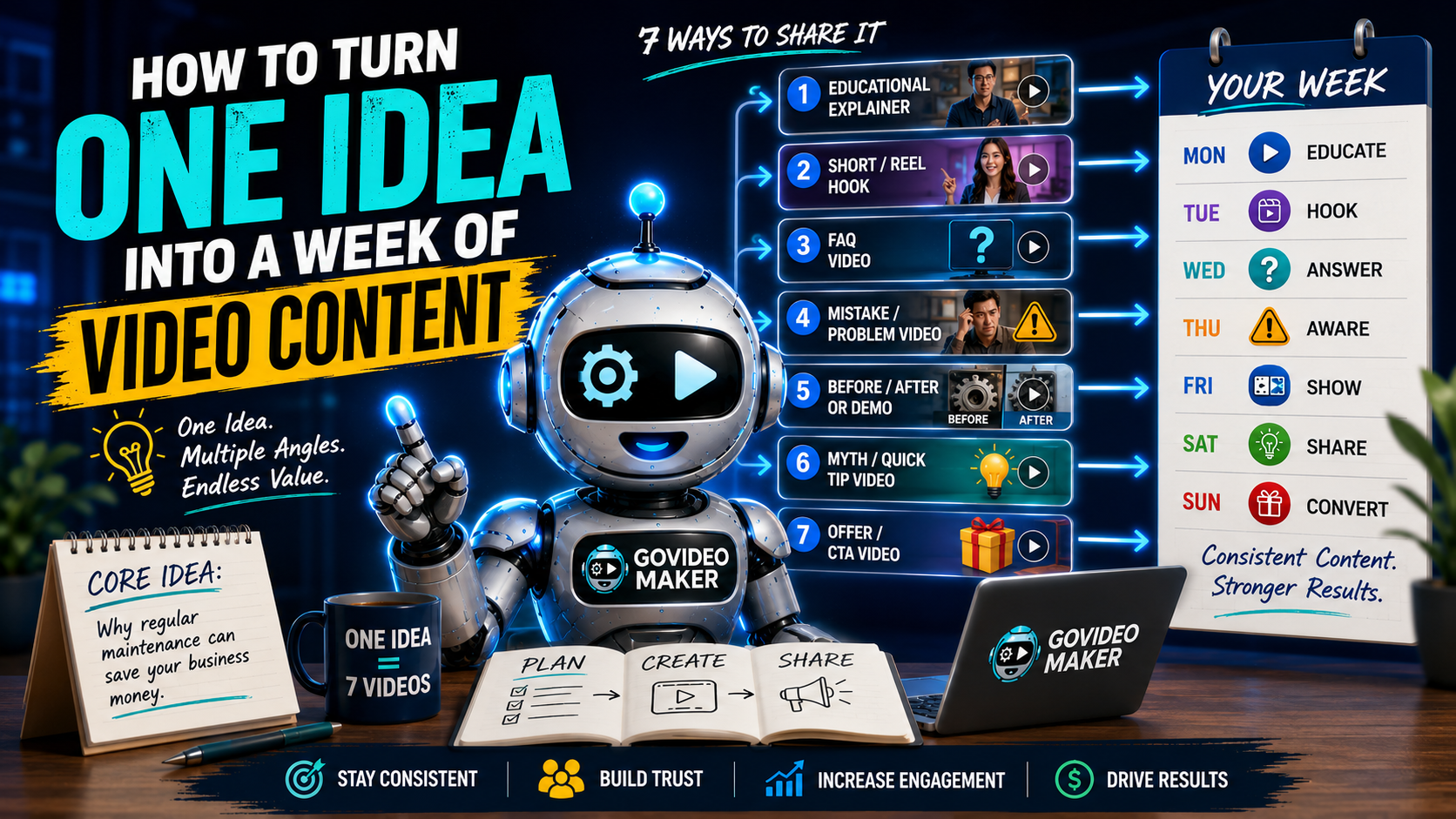
Coming up with video ideas every day can get exhausting.
Monday, you need a Reel.
Wednesday, you need another post.
Friday comes around and suddenly you’re staring at a blank screen thinking:
“What am I supposed to talk about now?”
Here’s the good news:
You probably don’t need more ideas.
You may just need to get more mileage out of the good ideas you already have.
One useful business topic can become several different videos when you change the angle, format, and purpose of each piece.
Instead of constantly asking, “What’s my next idea?”, try asking:
“How many useful pieces of content can I create from this one idea?”
Let’s break down a simple way to do it.
Stop Looking for 7 Ideas. Start With One Good Idea.
Imagine you run a business where regular maintenance helps customers avoid expensive repairs.
Your core idea might be:
“Why regular maintenance can save your business money.”
That’s already useful.
But instead of creating one video about it and immediately looking for another topic, we can look at that same idea from several perspectives.
One person may want a quick tip.
Another may have a question.
Someone else may respond better to a demonstration.
And a potential customer who’s already interested may simply need to know what to do next.
Same subject.
Different reasons to watch.
One Core Idea Can Become Multiple Videos
This is the basic framework:
ONE IDEA → MULTIPLE ANGLES → MULTIPLE FORMATS → CONSISTENT CONTENT
You aren’t saying the exact same thing seven times.
You’re finding different useful ways to communicate the same core subject.
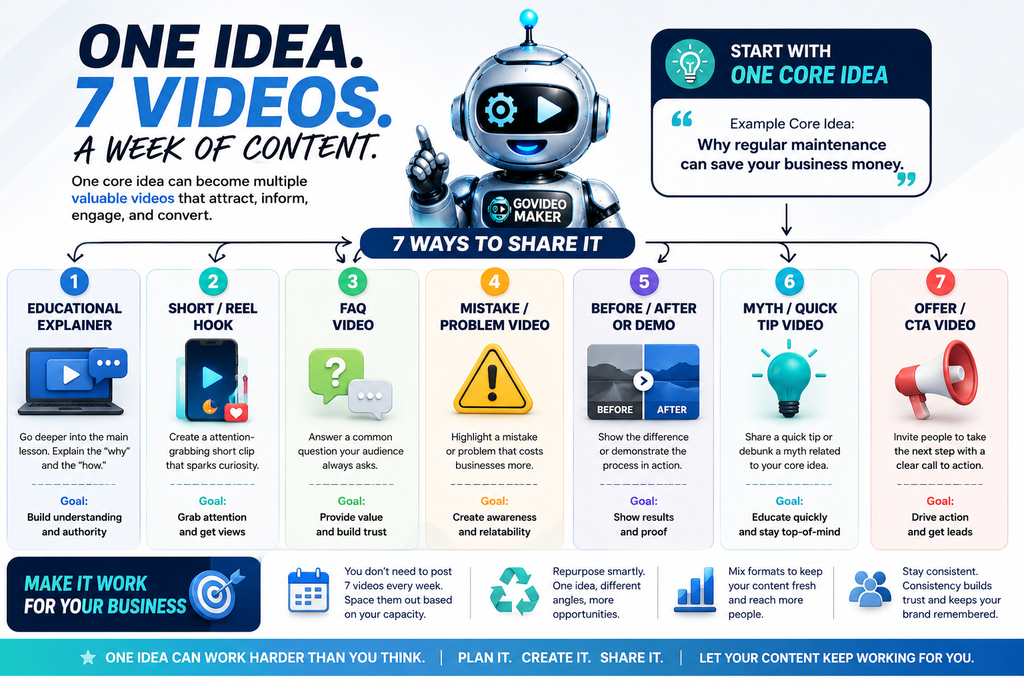
One core idea can become multiple videos by changing the angle, purpose, and format—not by repeating the exact same content seven times.
Now let’s look at what those videos could actually be.
Video #1: Create an Educational Explainer
Start with the main lesson.
This is where you can go a little deeper and explain the why behind your idea.
Using our maintenance example, the video might explain:
Why Regular Maintenance Can Save Your Business Money
You could cover what happens when maintenance is ignored, what problems can develop over time, and why prevention may cost less than waiting for something to fail.
This becomes your core educational piece.
It doesn’t necessarily need to be long.
The goal is simply to leave the viewer understanding something they didn’t understand before.
What This Video Is Good For
Educational explainers can help you:
- Demonstrate expertise
- Build authority
- Answer important customer questions
- Explain complicated services
- Give potential customers a reason to trust your advice
And once you have the main explainer, you already have material for several shorter videos.
Video #2: Pull Out a Short-Form Hook
Now take one interesting part of the explainer and turn it into a short Reel, Short, or social video.
For example:
“Most businesses don’t think about maintenance until something breaks. By then, the repair may already cost much more than the maintenance they skipped.”
That’s enough for a short video.
You don’t need to summarize the entire explainer.
The short has a different job:
Grab attention and introduce the idea.
Keep Short Videos Focused
A common mistake is trying to squeeze five lessons into 30 seconds.
Pick one.
One problem.
One tip.
One surprising fact.
One question.
One useful takeaway.
If viewers want more, your other content can take them deeper.
Video #3: Turn a Common Question Into an FAQ Video
Think about the questions customers already ask you.
There is probably content hiding inside them.
Using the same maintenance topic:
“How often should this actually be checked?”
There’s your next video.
Answer the question clearly.
No elaborate concept required.
Your Customers Are Already Giving You Content Ideas
Look at:
- Questions you receive through Messenger
- Emails
- Sales calls
- Comments
- Customer objections
- Questions asked before someone purchases
- Questions customers ask after purchasing
If several people ask the same thing, there’s a good chance other potential customers are wondering about it too.
Instead of answering that question privately for the hundredth time, consider turning it into content.
Video #4: Highlight a Mistake or Problem
Problems naturally create curiosity.
Take the same core idea and approach it from the mistake angle:
“The expensive maintenance mistake we see businesses make…”
Now we’re no longer simply explaining why maintenance matters.
We’re highlighting what can happen when someone gets it wrong.
You could show the mistake, explain why it happens, and give the viewer a practical way to avoid it.
Problem-Based Content Doesn’t Need Fear Tactics
There’s a difference between highlighting a genuine problem and exaggerating one just to get clicks.
You don’t need:
“THIS ONE MISTAKE WILL DESTROY YOUR BUSINESS!”
If the actual consequence is useful enough, explain it honestly.
Good marketing doesn’t need to manufacture panic.
Video #5: Show a Before-and-After or Demonstration
Now let’s make the idea visual.
Instead of explaining the difference, show it.
That might mean:
Before maintenance vs. after maintenance.
An inefficient process vs. an improved process.
An untreated surface vs. a protected one.
An old design vs. an updated design.
A product before use vs. the result after use.
Or simply demonstrate the process itself.
Let the Visuals Do Some of the Talking
Video works particularly well when the viewer can see the difference.
You may need less narration than you think.
Show the process.
Highlight what’s changing.
Use captions or voiceover where necessary.
Then let the visual evidence support the message.
Video #6: Create a Myth or Quick-Tip Video
Now simplify the topic again.
Ask:
What’s one thing people commonly misunderstand about this subject?
Maybe customers believe maintenance is only necessary when there’s already a visible problem.
That gives you:
“Quick myth: If everything looks fine, you don’t need maintenance.”
Then explain why that assumption may not always be correct.
Alternatively, skip the myth and share one practical tip related to the core idea.
Quick Tips Help You Stay Useful Without Repeating Yourself
These videos work because they don’t need to carry the entire subject.
They’re small pieces of value.
And they’re ideal for short-form platforms where people may discover your business for the first time.
Video #7: Create an Offer or Call-to-Action Video
By now you’ve:
Educated.
Answered a question.
Highlighted a problem.
Shown something visually.
Shared a quick tip.
Now it’s reasonable to create a piece of content that asks the viewer to take the next step.
For example:
“Not sure whether yours needs attention? Send us a photo and we’ll tell you what to check first.”
Or:
“Want us to take a look? Send us a message to schedule an inspection.”
The exact CTA depends on the business.
Not Every Video Needs to Sell
This is important.
If all seven videos end with aggressive sales pitches, the content will quickly start feeling repetitive.
Some videos can simply help.
Others can build awareness.
Others can establish credibility.
And some can ask for the sale.
That’s what makes the group of videos work together.
Do You Really Need to Publish 7 Videos Every Week?
No.
The title of this article is about what one idea can produce—not a rule saying every business must publish seven videos every seven days.
Maybe your realistic schedule is three videos per week.
Great.
One idea could potentially give you more than two weeks of content.
Maybe you publish four times per week.
The same idea could cover most of your schedule.
The goal is not to overwhelm yourself with another content quota.
The goal is to create a content bank.
Build Ahead Instead of Starting From Zero Every Day
Imagine having five strong business topics.
If each one produces several useful angles, suddenly you aren’t looking at five pieces of content.
You may be looking at weeks of potential material.
That makes consistency much easier.
One Idea Doesn’t Mean One Format
Another advantage of this approach is that every piece doesn’t have to look the same.
The educational explainer might use an AI presenter.
The short-form hook could use B-roll and voiceover.
The FAQ might feature the business owner speaking directly to the camera.
The demonstration could use real product footage.
The quick tip might use a talking photo.
The promotional video could combine real footage, AI-generated visuals, captions, motion graphics, and music.
The message determines the format.
That’s something we’ve discussed before: you don’t need to be on camera for every business video, and you don’t need to choose between AI and traditional production for everything either.
Often, the most practical approach is simply to use whatever format communicates each idea best.
Repurposing Isn’t the Same as Reposting
There’s an important distinction here.
Repurposing does not mean uploading the exact same video seven times with different titles.
You’re keeping the core subject but changing something meaningful:
The angle.
The question.
The hook.
The format.
The length.
The audience awareness level.
Or the desired action.
Think of it less like photocopying one piece of content and more like looking at the same subject through different camera angles.
A Simple Content Planning Formula
The next time you have a good business topic, try this before looking for another one.
Write your core idea at the top of a page.
Then ask:
What Can I Teach?
This becomes your educational video.
What’s the Strongest Hook?
This becomes your short-form video.
What Question Would a Customer Ask?
That’s your FAQ.
What Mistake Should People Avoid?
That’s your problem-based video.
What Can I Show Instead of Explain?
That’s your demonstration or before-and-after.
What’s One Quick Tip or Myth?
That’s another short-form piece.
What’s the Logical Next Step?
That’s your CTA video.
Suddenly, one line on a page has become a small content plan.
Why This Approach Works for Small Businesses
Most small businesses don’t have a full-time content department.
The owner may also be handling customers, operations, sales, staff, accounting, and everything else that needs attention.
Expecting that person to invent an entirely new video concept every day isn’t always realistic.
A better system is to capture good ideas when you have them and make those ideas work harder.
You probably already have more potential content than you realize.
It’s sitting inside:
Customer questions.
Your services.
Your products.
Your sales conversations.
Common mistakes.
Customer success stories.
Your process.
Industry myths.
Things you wish customers understood before contacting you.
That’s your content library.
You just haven’t turned all of it into content yet.
You Don’t Always Need More Ideas
When businesses struggle with consistency, the first instinct is often:
“We need more content ideas.”
Sometimes that’s true.
But sometimes the better answer is:
Use the ideas you already have more effectively.
One strong subject can educate someone.
Answer their question.
Help them avoid a mistake.
Show them a result.
Give them a quick tip.
And eventually invite them to take action.
That’s a lot of work from one idea.
And when you build content this way consistently, you’re no longer creating isolated videos.
You’re starting to build a video content system.
Turn Your Business Ideas Into Videos Worth Watching
You don’t need to arrive with seven scripts, a production plan, and a list of AI tools.
Start with what you know.
Tell GoVideoMaker about your business, your audience, and the idea you want to communicate.
We can help shape that idea into the right video formats and create content designed to promote, explain, sell, or share what your business does.
You bring the idea. GoVideoMaker turns it into video.
Create Better Videos, One Useful Idea at a Time.
Get practical video marketing strategies, AI video tips, and creative inspiration delivered to your inbox.